


bimmer-tool
4.038.00 Reviews
App Specs
- Version
- 3.8.26
- Updated On
- License
- $19.99
- Downloads
- 10,000+
- Developer
- bimmer-tool
- Categories
- Auto & Vehicles
- Platform
- Android
Screenshots
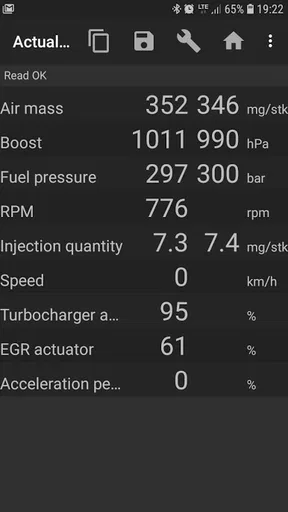
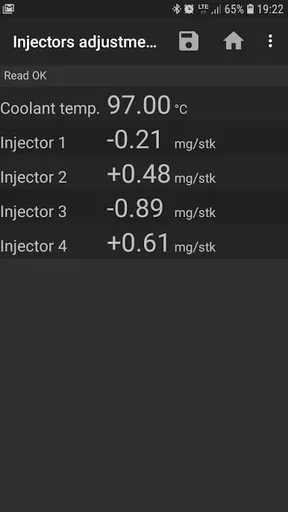
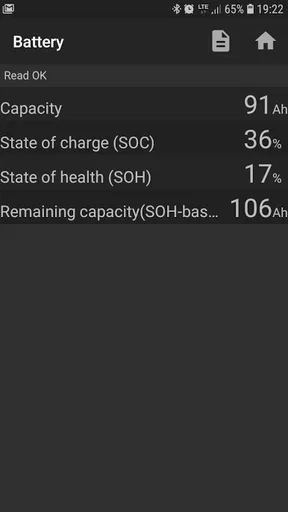
 Analysis by AppCompare
If you’re a proud BMW owner, you’re probably always on the lookout for tools to enhance your driving experience. Well, I’ve got something exciting for you! Let me introduce you to bimmer-tool. Yes, you heard that right! This app is like having a personal mechanic right in your pocket. Let’s dive into what makes this app a must-have for any BMW enthusiast.
I’d describe its appeal more cautiously: it’s a way to bring certain BMW-focused checks and tasks to your phone, not a replacement for a mechanic or a guarantee that every problem can be diagnosed at home. That distinction matters. The app is most useful when you want to investigate a warning, monitor information while troubleshooting, or handle a supported maintenance task yourself, and you’re comfortable connecting to the car’s OBD system.
Unlocking the Secrets of Your Ride
Imagine having access to your car’s inner workings without having to visit a workshop. That’s exactly what bimmer-tool offers. With just a few taps, you can connect your smartphone to your car’s OBD system and uncover a treasure trove of information.
In practical terms, I would use that access as a first step, not as a final diagnosis. A code or live reading can help narrow down what deserves attention, but it does not automatically explain the root cause or tell you whether a repair is safe to postpone. The useful habit is to record what you see, note when the warning appeared, and share those details with a qualified technician if the issue involves drivability, braking, or another safety-critical system.
Feature Highlights
Once you’ve installed the app, you’ll find a variety of features designed to make your life easier. Here are some of the cool things you can do:
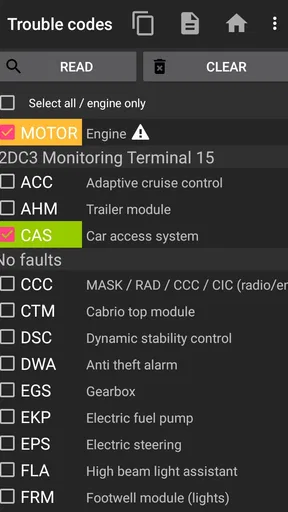
- Diagnostic Trouble Codes: Keep an eye on your car’s health by reading and clearing trouble codes. No more guessing games when that mysterious check engine light pops up.
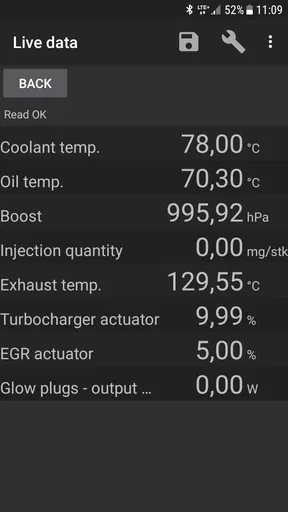
- Live Data: Get real-time data on your car’s performance. If you’re a numbers geek, you’ll love seeing how your engine is doing under different conditions.
- Service Resets: Need to reset your oil light or brake pad warning? This app lets you do that with ease.
- Battery Registration: If you’ve ever had to change your car battery, you know how important this feature is. Register your new battery and keep everything running smoothly.
The live readings are especially valuable when you compare conditions rather than fixating on one number. For example, if a symptom appears only after the engine warms up, observing data at startup and again after a normal drive may give you a more useful picture than a single parked check. Keep the car safely stationary when you’re navigating screens; collecting information should never distract you behind the wheel.
Battery registration is another feature where timing and context matter. It is relevant after a battery replacement, but the app cannot make a mismatched battery or an installation problem disappear. I’d treat registration as one part of a careful replacement process: confirm the correct battery has been fitted, then use the app for the supported registration task rather than assuming that every battery-related warning calls for a reset.
Worth Reading Before You Choose

Baby Panda World Brings Quick Play to Modern Phones, but Its Game Library Feels Busy

ESPN’s Live Game View Makes Following Close Games Easier

QuizzLand Review: A Good Fit for Short Trivia Breaks, Not Every Player

Basketball Stars: Multiplayer Is Fast, but Can It Recover When Matches Go Wrong?

WEBTOON Turns Phone Updates Into a Better Reading Routine

Link to Windows Runs on Shared Habits, Not Social Feeds
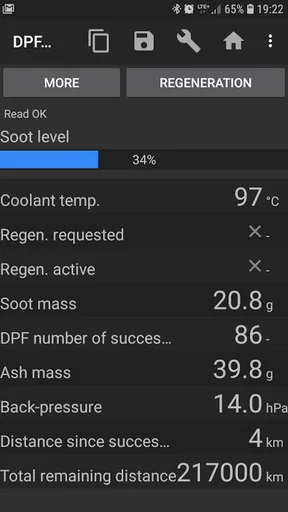
The store summary also highlights DPF regeneration, a more specialized task than routine code reading. That makes the app potentially useful to an owner dealing with a diesel particulate filter concern, but it is not something I would start casually just because an alert appears. Understand the car’s condition and follow appropriate safety guidance before attempting a regeneration; if you are unsure what the warning means, a workshop is the better first stop.
User Experience
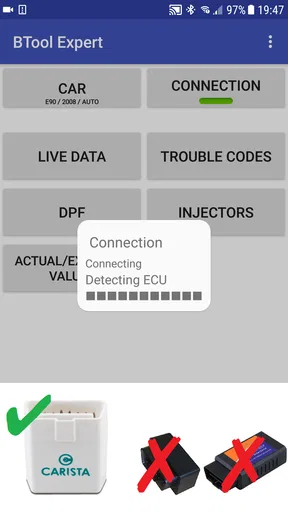
Navigating through the app is a breeze. The interface is clean and intuitive, making it easy for even the least tech-savvy among us to use. Connecting to your car is straightforward, and the app does a great job of guiding you through the process step by step.
That ease of use helps once the connection is working, but an OBD app still depends on a compatible setup and a successful connection to the vehicle. Before relying on it for a job, I’d check that your BMW and adapter are supported, then test the connection while you have time to troubleshoot rather than waiting until you are stranded or rushing to a service appointment.
One thing I really appreciate is the app’s ability to provide detailed explanations for each feature and code. It’s like having a mini BMW manual right at your fingertips. This is especially helpful if you’re not quite sure what a particular code means.
Even a clear explanation should be read as a clue, not a verdict. A code can point toward a system or condition without identifying the failed part, and clearing it too quickly can erase useful context or simply make a warning disappear temporarily. My practical approach would be to note the code and symptoms first, investigate what the explanation suggests, and only clear a code when I understand why I’m doing it.
Compatibility and Accessibility
Now, you might be wondering, “Will this work with my car?” The good news is that bimmer-tool supports a wide range of BMW models. However, it’s always a good idea to check the app’s compatibility list to ensure your specific model is covered.
That check is worth doing before paying, especially if your BMW is an older model or you want to use a particular service function rather than basic diagnostics. A broad range does not mean every function works on every car. I would confirm the exact model and the task you care about, and then verify the OBD adapter requirements, instead of treating “BMW compatible” as a promise that every menu item will apply to your vehicle.
The app is available for both Android and iOS, so no matter what device you’re using, you can tap into its powerful features. Simply head to the respective app store, download, and you’re all set to go.
For Android, the current version is 3.8.18 and it requires Android 5.0 or later. It is rated for Everyone, which describes its content rating rather than the skill needed to work with vehicle diagnostics. Developed by bimmer-tool, it is a paid Auto & Vehicles app priced at $19.99, so I’d make the compatibility check part of the purchase decision rather than buying on the assumption that every BMW and adapter will behave alike.
Its 4.0 average from around 1.9 thousand ratings, alongside more than 10 thousand installs, suggests that drivers have found a use for it, but those figures cannot tell you whether it supports your exact model or whether you’ll be comfortable with its more technical tasks. The app was released on August 1, 2017, and has 37 reviews. I would weigh those signals less heavily than confirming the feature you need on your own vehicle.
Choosing the Right Tool for the Job
Compared with a basic generic OBD reader, a BMW-focused app can be more appealing when your goal goes beyond checking a simple engine warning. The combination of diagnostics, live information, service-related functions, battery registration, and DPF regeneration gives an owner several reasons to keep it available. A basic reader may be the better choice if all you want is an occasional engine-code check and you prefer the simplest possible setup; a professional diagnostic service is better when you need a thorough fault investigation or are not confident acting on the results.
There is also a middle ground: use the app to arrive at a workshop better prepared. If a warning appears before a planned service, you can check the available information, write down the symptom and when it happens, and explain what you observed. That can make the conversation more focused without pretending that phone-based diagnostics have replaced hands-on inspection.
A realistic example is a battery replacement at home. After fitting the correct replacement, you could connect the app and use its battery-registration function if your model supports it. If the car still shows a warning afterward, I would not keep repeating resets; I’d check the installation and compatibility, preserve any fault information, and seek help if the issue remains. That workflow is safer and more useful than treating a reset as proof that the underlying problem is solved.
Why You Should Try It
So, why should you give bimmer-tool a shot? For starters, it can save you a ton of money on diagnostics. Instead of running to the mechanic every time a light comes on, you can quickly check what’s going on yourself. Plus, it empowers you to understand your vehicle better, making you a more informed driver.
I’d soften the promise of savings: it may help you avoid a workshop visit for a straightforward check or supported reset, but it cannot guarantee that a repair is unnecessary. The strongest reason to choose it is control over the first stage of troubleshooting. You can gather information on your own schedule and decide whether the next step is a simple maintenance task or professional diagnosis.
And let’s not forget the convenience factor. Being able to perform resets and other adjustments from your phone is a game-changer. It’s like having a magic wand for your BMW!
That convenience is most valuable to owners who already do some maintenance, enjoy understanding their car, and are willing to read carefully before changing settings. If you only want a quick answer with no setup, or you are uncomfortable interpreting codes and vehicle data, a mechanic or a simpler reader may be less frustrating. I would also skip it if your main need is broad, brand-agnostic diagnostics across different makes rather than BMW-specific use.
Overall, if you’re passionate about your car and enjoy having the latest tech at your disposal, bimmer-tool is definitely worth checking out. It’s packed with features that will make you feel like a pro mechanic in no time.
My recommendation is more specific: it is worth considering for a BMW owner who has confirmed compatibility, has a suitable OBD setup, and wants to handle selected checks and maintenance tasks with care. It is less compelling as an impulse purchase for someone who expects a phone app to identify every fault or replace a professional scan. The $19.99 cost makes that distinction important; the value depends on whether you will use the BMW-focused functions, not simply on how many features appear in a menu.
So, go ahead, give it a whirl, and see how it transforms your driving experience. Your BMW will thank you, and you’ll wonder how you ever lived without it.
I would start with a modest first session: confirm the connection, check what information is available for your car, and learn the code-reading workflow before attempting resets or more specialized tasks. Keep notes, avoid interacting with the phone while driving, and let a technician handle anything you cannot confidently interpret. Used that way, this app can be a practical companion for an informed BMW owner—not a substitute for sound diagnosis, but a useful way to ask better questions about the car.
Pros
- User-friendly interface for easy navigation.
- Comprehensive diagnostic features available.
- Supports a wide range of BMW models.
- Real-time data display for accurate monitoring.
- Regular updates enhance functionality.
Cons
- Limited free features; most are premium.
- Initial setup can be time-consuming.
- Requires OBD-II adapter for full use.
- Occasional connectivity issues reported.
- Not all features available for older models.
FAQs for bimmer-tool
What is the main purpose of the bimmer-tool app?
The bimmer-tool app is designed for BMW enthusiasts who want to diagnose and customize their vehicles. It provides access to a range of diagnostic features, allowing users to read and clear fault codes, monitor real-time data, and perform various tests. It's a valuable tool for maintaining and optimizing your BMW's performance.
Is the bimmer-tool app compatible with all BMW models?
While the bimmer-tool app supports a wide range of BMW models, compatibility may vary depending on the specific model and year of your vehicle. It's important to check the app's compatibility list on the official website or app store page before downloading to ensure it will work with your particular BMW.
What features does the bimmer-tool app offer?
The bimmer-tool app offers a variety of features including reading and clearing diagnostic trouble codes (DTCs), real-time data monitoring, service reset, and battery registration. It also allows for basic coding and adaptations, making it a versatile tool for both DIY enthusiasts and professional mechanics.
Do I need any additional equipment to use the bimmer-tool app?
Yes, to use the bimmer-tool app effectively, you will need an OBD-II adapter. This device connects to your vehicle’s OBD-II port and pairs with your smartphone via Bluetooth or Wi-Fi. Ensure you have a compatible adapter before using the app for accurate data and diagnostics.
Is the bimmer-tool app user-friendly for beginners?
The bimmer-tool app is designed with a user-friendly interface, but it may have a learning curve for those unfamiliar with automotive diagnostics. It includes guides and support to help users navigate its features. Beginners are encouraged to start with basic tasks and explore more advanced options as they gain confidence.


